

What is an agent?
If you’ve used ChatGPT or similar tools, you’re already familiar with chatbots. You ask a question, it gives you an answer. That’s where it stops. An agent is different. It takes action. Think of it this way:- A chatbot will tell you how to order pizza.
- An agent checks restaurants, compare prices, place the order, and let you know when it arrives.
Modes
Macaly has 3 modes that control how the agent handles your requests:- Build: Builds immediately without asking questions. Best if you know exactly what you want.
- Plan: Creates a plan or asks clarifying questions before building. Use when the task is complex or you want to review the approach first.
- Auto (default): Decides when to plan and when to build. Simple requests are built right away, complex ones trigger planning or questions.
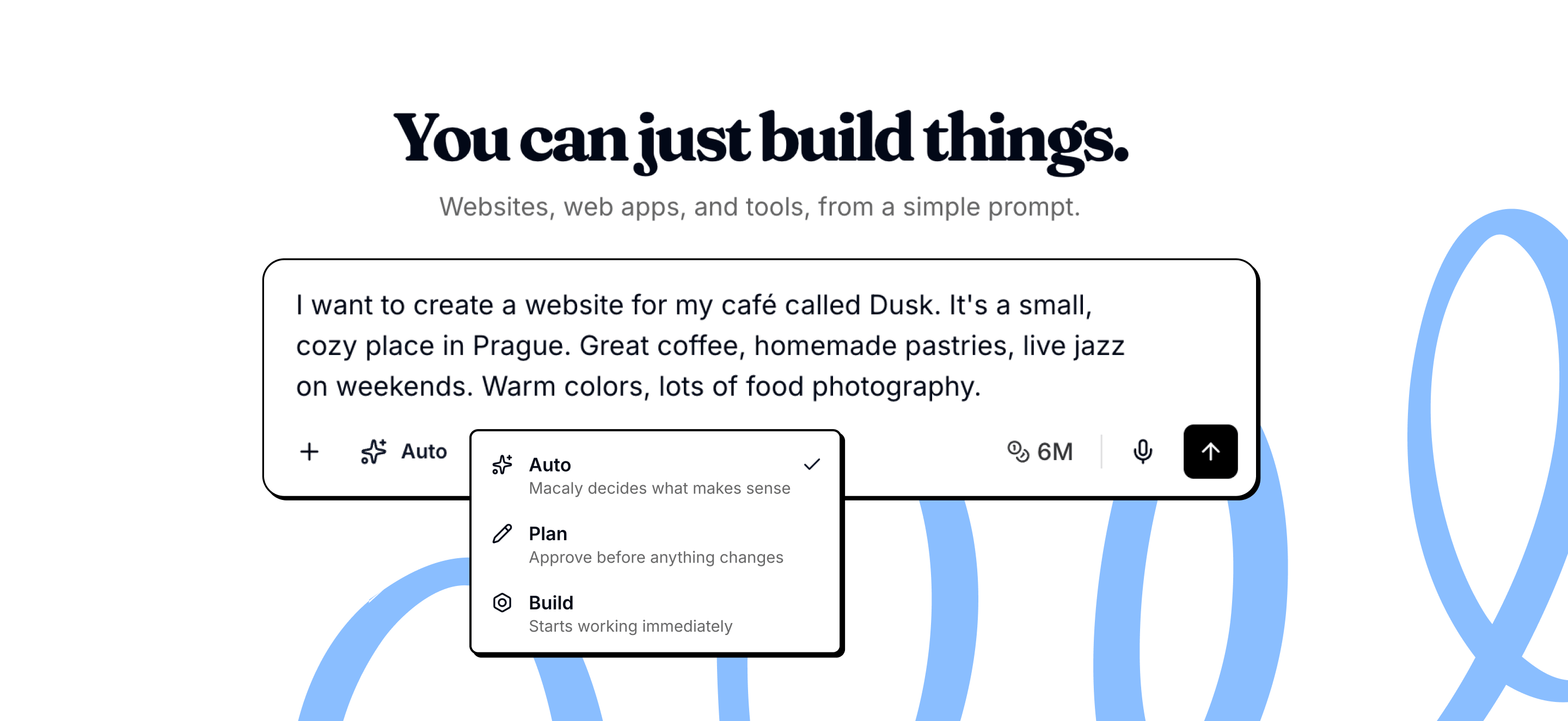
Agent abilities
The agent acts as a collaborator who can plan, ask questions, research, and build your app from start to finish.Plan before building
Plan before building
For complex features, the agent breaks your request into steps and shows you the plan first. You can review and approve before anything is built.
Ask when something is unclear
Ask when something is unclear
Instead of guessing, the agent pauses to ask focused questions. This means the result matches what you actually want.
Remember past decisions
Remember past decisions
The agent keeps context from earlier in your project, so changes stay consistent with choices you made before.
Research on the web
Research on the web
If the agent needs current information, examples, or documentation, it looks them up on the web.
Learn from existing websites
Learn from existing websites
When you share a URL, the agent can understand the structure and design to use as reference or inspiration.
Work with photos
Work with photos
It finds high-quality stock photos that fit your project, like hero images, backgrounds, or lifestyle shots.
Create custom visuals
Create custom visuals
Generates new images, edits existing ones, or removes backgrounds when stock photos don’t fit.
Make changes for you
Make changes for you
You don’t need to touch code. The agent updates pages, content, layout, and functionality based on what you ask for.
Review its own work
Review its own work
Before finishing, the agent reviews what it built to catch mistakes or missing details.
AI Models
Open Settings → General → AI Model to choose the model for a project. The options depend on your white-label platform’s configuration and can include:- OpenAI: GPT-5.6 Terra, Sol, and Luna — processed in the US
- Anthropic: Sonnet 5 and Opus 5 — processed in the EU
- Grok 4.5 and Kimi K3 — processed in the US
- Minimax 3, GLM 5.2, and DeepSeek Flash v4 — processed in the EU
Frequently asked questions
The agent got stuck or is taking too long. What can I do?
The agent got stuck or is taking too long. What can I do?
If the agent shows no progress for more than 10 to 15 minutes, reload the page first. If the preview is frozen, open the preview menu and choose Rebuild Preview on newer projects or Restart App on older projects.If the last change left the project in a broken state, use Version history where available or Restore this version on the last good agent response. If the problem persists, report the issue from the affected response and include the chat link, approximate time, and a screenshot or error details.
The agent keeps making the same error. How do I avoid burning credits?
The agent keeps making the same error. How do I avoid burning credits?
When reporting an error, be as specific as possible. Describe what you were doing before the error, what you see now, what is not working, and what the correct behavior should be. The more detail you provide, the better the agent can fix it on the first try.
Should I split large requests into smaller steps?
Should I split large requests into smaller steps?
Yes. The amount of work the agent can complete varies by task and may include parallel work, so there is no single useful step limit. Break large or dependent requests into manageable prompts, verify each result, and then continue.
How do I create a backup of my project?
How do I create a backup of my project?
Use Version history where available or Restore this version to return to a known-good build. Duplicate the project when you want a separate branch to experiment in, not as the primary recovery mechanism. Normal duplicates start without conversation history, and projects with a database let you choose whether to create a new database or use the same one.
Can I restore a previous version of my project?
Can I restore a previous version of my project?
Yes. Open Version history where available to browse previous previews, identify the latest and published builds, open a version separately, or restore it. You can also use Restore this version under an agent response to return the project code to that point.
When should I use /compact?
When should I use /compact?
Use
/compact when a long chat starts losing focus or before moving into a new but related task. It summarizes the conversation while keeping the same project and code. Creating the summary uses credits and requires a minimum balance, but the shorter context may reduce the cost of later messages. Avoid running it after every message because repeated summaries can lose detail.