

What is a domain?
A domain is the address people type into their browser to visit your website, like example.com. Think of it as the public name of your site. When someone opens that address, their browser loads the content of your project. In Macaly, you don’t need to set this up upfront. Publishing your project automatically gives you a working domain so your site is immediately accessible.Free Macaly subdomain
Every published Macaly project goes live on a free Macaly subdomain, for example:Older projects may have an address ending in
macaly-app.com. Those keep working as before.Custom domain
A custom domain is a branded address like example.com. If you want your site to live on your own domain, you can connect a domain you already own from any registrar. White-label platforms can configure domains in different ways. Your DNS provider may configure the required records automatically, your brand may activate the domain through a partner proxy, or the platform may show records for you to add manually. Follow the status and instructions shown in Settings → Domains.How to Publish your Web or App
1
Publish your project
Click Publish in the top-right corner of the editor. Macaly builds and deploys the latest version of your project automatically.Once publishing finishes, your site is live on a free Macaly subdomain and ready to be shared or connected to a custom domain.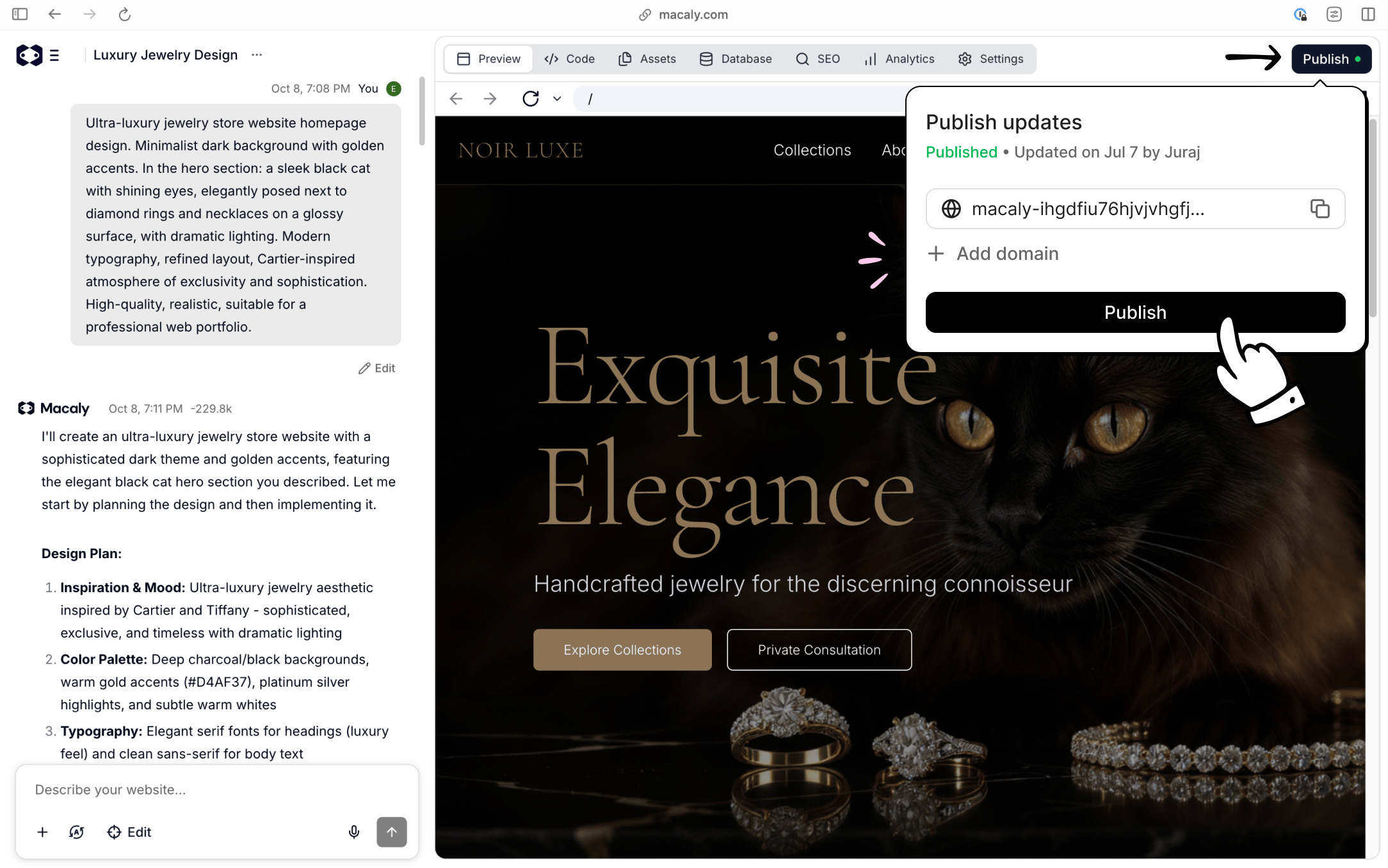
2
Connect a domain you already own
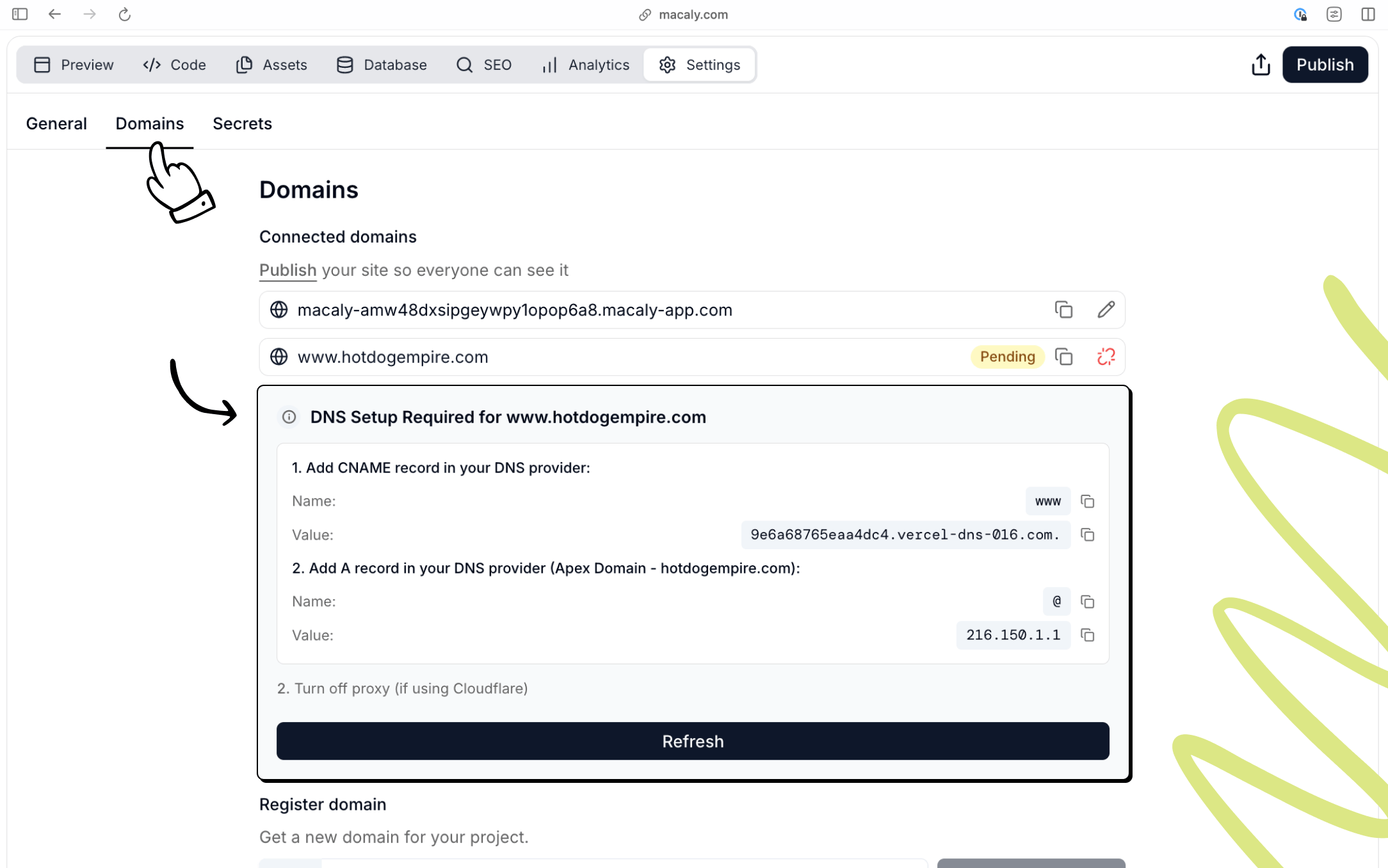
Open Settings → Domains, enter your domain, and click Connect.
- If the page says that DNS is being configured, wait a few minutes and refresh the status. Do not add records unless the platform asks you to.
- If the platform shows DNS records, copy those exact values into your domain provider’s DNS settings and return to refresh the status.
-
If your brand activates domains through a partner proxy, no manual DNS step appears in Macaly.
Hosting
Macaly handles hosting and deployment for you. When you publish a project, it’s deployed automatically, served securely over HTTPS, and optimized for performance and SEO by default. You don’t need to manage servers, SSL certificates, or a separate hosting provider.Frequently asked questions
How do I connect my own custom domain?
How do I connect my own custom domain?
In your project, go to Settings → Domains, type your domain name, and click Connect. Then follow the status shown there. Some white-label setups configure DNS automatically or activate the domain through a partner proxy. If the platform shows DNS records, add those exact values at your registrar and return to click Refresh.
What DNS records do I need to add for my custom domain?
What DNS records do I need to add for my custom domain?
Add records only when Settings → Domains asks you to. Manual setups typically need two records:
- An A record for the root domain pointing to Macaly’s IP address
- A CNAME record for
wwwpointing to Macaly’s hostname
My site works at www but shows an SSL error at the bare domain. How do I fix it?
My site works at www but shows an SSL error at the bare domain. How do I fix it?
Check Settings → Domains first. If it shows a missing apex record, add the exact A record displayed there and remove conflicting A or AAAA records for the root domain. If your white-label provider manages DNS automatically or uses a partner proxy, refresh the status and contact your brand’s support team instead of changing records blindly.
My domain still shows Pending or Not connected. What should I do?
My domain still shows Pending or Not connected. What should I do?
If the page says that DNS is being configured automatically, wait a few minutes and click Refresh. For manual setup, confirm that the records at your registrar exactly match what the platform shows and remove conflicting records. DNS propagation can take up to 24 hours. For partner-proxy setups, contact your brand’s support team if the domain does not activate.
Can I set up email for my custom domain?
Can I set up email for my custom domain?
Macaly does not provide email hosting. For email on your custom domain (e.g. info@yoursite.com), sign up with a third-party provider such as Google Workspace, Zoho, or Microsoft 365, and configure their MX records with your registrar. Once you have an email address, the Macaly agent can set up contact forms to send notifications to it.